


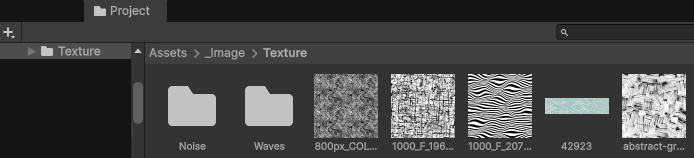
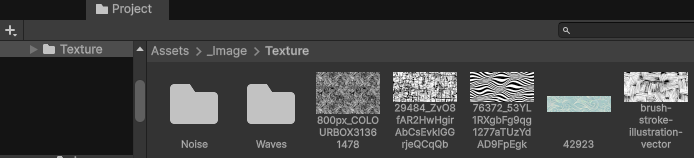
I appreciate the vast majority of the interfaces Unity offers, but the fact that I can’t see the full file names without switching to List View or zooming in like a barbarian drives me crazy.
So, I found a neat workaround that solves the problem without having to recreate the entire Project window.
C#
using System.IO;
using System.Linq;
using UnityEditor;
using UnityEngine;

namespace Enosi.Editor.ProjectWindow
{
    [InitializeOnLoad]
    public static class ProjectWindowFullNames
    {
        private const int MAX_LINES = 4;

        private static GUIStyle _style;
        private static GUIStyle _background;

        static ProjectWindowFullNames()
        {
            EditorApplication.projectWindowItemOnGUI += OnItemGUI;
        }

        private static void OnItemGUI(string guid, Rect rect)
        {
            if (Event.current.type != EventType.Repaint || rect.height <= 20f) return;

            string name = Path.GetFileNameWithoutExtension(AssetDatabase.GUIDToAssetPath(guid));
            if (string.IsNullOrEmpty(name)) return;

            _style ??= new GUIStyle("ProjectBrowserGridLabel")
            {
                fixedHeight = 0f,
                wordWrap = true,
                alignment = TextAnchor.LowerCenter,
                clipping = TextClipping.Clip,
                padding = new RectOffset(1, 1, 0, 0),
            };
            _background ??= new GUIStyle("ProjectBrowserIconAreaBg");

            var content = new GUIContent(name);
            if (_style.CalcSize(content).x <= rect.width) return;

            float lineHeight = _style.lineHeight;
            float height = Mathf.Min(_style.CalcHeight(content, rect.width), lineHeight * MAX_LINES);
            var labelRect = new Rect(rect.x, rect.yMax - height, rect.width, height);

            bool selected = Selection.assetGUIDs.Contains(guid);
            if (selected && EditorGUIUtility.editingTextField) return;
            bool focused = EditorWindow.focusedWindow?.GetType().Name == "ProjectBrowser";

            _background.Draw(labelRect, false, false, false, false);
            _style.Draw(labelRect, content, false, false, selected, focused);
        }
    }
}Don’t forget to put your script in an « Editor » folder.
– Voidstack