
Récapitulatif des étapes rencontrées à la création et à la publication d’un plugin, basé sur mon expérience pour le plugin github.com/r-for-maven.
Il ne s’agit pas d’un tutoriel pour apprendre à coder en Java, mais plutôt d’une suite d’étapes à suivre afin de publier un plugin sans difficulté.
1. Prérequis
- JDK, Maven, IDE (IntelliJ, Eclipse)
- Gpg4win (Kleopatra)
- Un compte utilisateur sur central.sonatype.com.
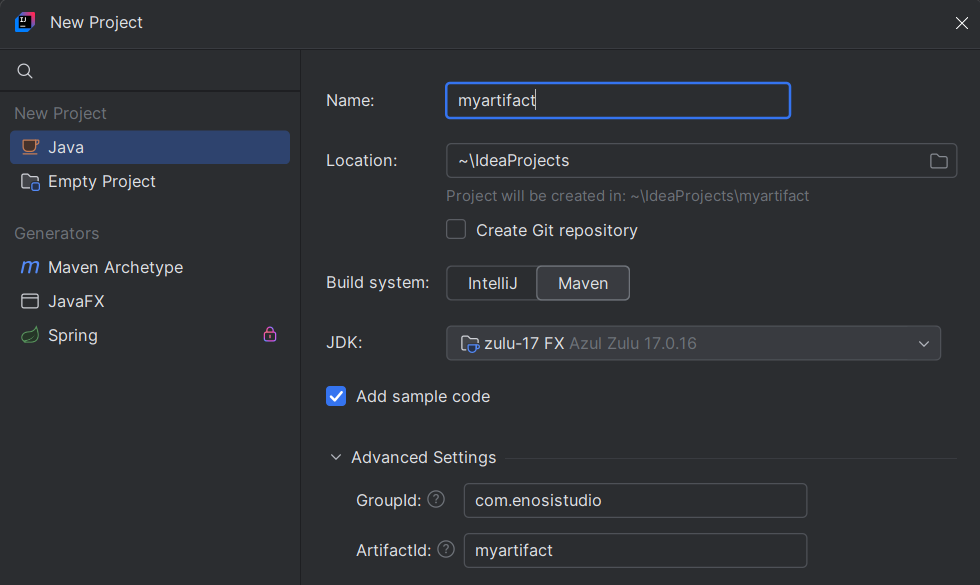
2. Génération du projet sous intellij
3. Ecriture d’une classe Mojo de base
Ici, pas de surprise : c’est le code qui sera exécuté lors de la phase sélectionnée dans l’annotation @Mojo(name="peuImporte", defaultPhase = LifecyclePhase.MA_PHASE)
package com.enosistudio;

import org.apache.maven.plugin.AbstractMojo;
import org.apache.maven.plugin.MojoExecutionException;
import org.apache.maven.plugins.annotations.LifecyclePhase;
import org.apache.maven.plugins.annotations.Mojo;
import org.apache.maven.plugins.annotations.Parameter;

import java.io.File;
import java.io.FileWriter;
import java.io.IOException;
import java.io.InputStream;
import java.nio.charset.StandardCharsets;
import java.util.*;

/**
 * Mojo to generate a Java class with constants for resource files and folders.
 * The generated class will be named R and will contain a hierarchical structure
 * for accessing files and folders.
 */
@SuppressWarnings("unused")
@Mojo(name = "generate", defaultPhase = LifecyclePhase.GENERATE_SOURCES)
public class GenerateRMojo extends AbstractMojo {
    private static final String PATH_SEPARATOR = "/";

    /**
     * If true, generated files will be placed in src/main/generated instead of target/generated-sources/java.
     */
    @Parameter(defaultValue = "true")
    private boolean keepInProjectFiles;

    /**
     * Directory containing resource files to scan.
     */
    @Parameter(defaultValue = "${project.basedir}/src/main/resources")
    private File resourcesDir;

    /**
     * Java package name for the generated R class.
     */
    @Parameter(defaultValue = "com.enosistudio.generated")
    private String packageName;

    /**
     * Base directory for generated sources (when keepInProjectFiles is false).
     */
    @Parameter(defaultValue = "${project.build.directory}/generated-sources")
    private File outputTargetDirectory;

    /**
     * Base directory for generated sources (when keepInProjectFiles is true).
     */
    @Parameter(defaultValue = "${project.basedir}/src/main/java")
    private File outputSrcDirectory;

    /**
     * Executes the Mojo to generate the R.java file.
     * @throws MojoExecutionException if an error occurs during generation
     */
    public void execute() throws MojoExecutionException {
        // Choose the base directory
        File baseDir = keepInProjectFiles ? outputSrcDirectory : outputTargetDirectory;
        String packagePath = packageName.replace('.', '/');
        File outputDir = new File(baseDir, packagePath);

        if (!outputDir.exists() && !outputDir.mkdirs()) {
            throw new MojoExecutionException("Failed to create output directory: " + outputDir);
        }

        try {
            generateResourceClasses(outputDir);
        } catch (IOException e) {
            throw new MojoExecutionException("Failed to generate resource classes", e);
        }

        getLog().info("Generated R.java with hierarchical resource structure");
    }

    ...

  }
}4. Ecriture du pom
Ici il y a plusieurs choses à noter :
<packaging>maven-plugin</packaging>indique à Maven que le projet doit être construit comme un plugin Maven et non comme une simple bibliothèque (jar) ou une application.- <scm> toute cette partie sert à indiquer à Maven (et aux outils qui s’y connectent) où se trouve le code source de le projet.
<artifactId>maven-plugin-api</artifactId>L’API de base pour développer un plugin Maven, elle fournit les classes essentielles commeAbstractMojo,MojoExecutionException…
Scope provided car maven fournit cette API à l’exécution, pas besoin de l’embarquer<artifactId>maven-plugin-annotations</artifactId>Annotations pour définir les mojos et paramètres (@Mojo, @Parameter, @Component, etc.) permet de déclarer les goals et leurs configurations de manière déclarative.
Scope provided car utilisé uniquement à la compilation pour générer les métadonnées<artifactId>maven-plugin-plugin</artifactId>Il génère le descripteur du plugin (plugin.xml) et la documentation, sans lui, maven ne reconnaîtra pas le JAR comme un plugin Configuration<goalPrefix>generate</goalPrefix>définit le préfixe des goals<artifactId>central-publishing-maven-plugin</artifactId>pour publier le Maven Central via le nouveau système Sonatype (2025), remplace l’anciennexus-staging-maven-plugin
Configuration :publishingServerIdpour l’authentification<artifactId>maven-source-plugin</artifactId>Génère un JAR contenant le code source, obligatoire pour Maven Central<artifactId>maven-javadoc-plugin</artifactId>Génère un JAR contenant la documentation Javadoc, obligatoire pour Maven Central<artifactId>maven-gpg-plugin</artifactId>Signe les artefacts avec GPG, obligatoire pour Maven Central
<?xml version="1.0" encoding="UTF-8"?>
<project xmlns="http://maven.apache.org/POM/4.0.0"
         xmlns:xsi="http://www.w3.org/2001/XMLSchema-instance"
         xsi:schemaLocation="http://maven.apache.org/POM/4.0.0 http://maven.apache.org/xsd/maven-4.0.0.xsd">
    <modelVersion>4.0.0</modelVersion>
    <groupId>com.enosistudio</groupId>
    <artifactId>r-for-maven</artifactId>
    <version>1.0.2</version>
    <packaging>maven-plugin</packaging>

    <!-- Metadata for project -->
    <name>r-for-maven</name>
    <description>Generate compile-time constants for all your resource files automatically, just like Android's R.java class.</description>
    <url>https://github.com/Voidstack/r-for-maven</url>

    <!-- License for project -->
    <licenses>
        <license>
            <name>Apache License, Version 2.0</name>
            <url>https://www.apache.org/licenses/LICENSE-2.0.html</url>
        </license>
    </licenses>

    <!-- Developer for project -->
    <developers>
        <developer>
            <id>voidstack</id>
            <name>#</name>
            <email>#</email>
        </developer>
    </developers>

    <!-- SCM for link repository -->
    <scm>
        <connection>scm:git:git://github.com/Voidstack/r-for-maven.git</connection>
        <developerConnection>scm:git:ssh://github.com:Voidstack/r-for-maven.git</developerConnection>
        <url>https://github.com/Voidstack/r-for-maven</url>
    </scm>

    <!-- Properties for project -->
    <properties>
        <maven.compiler.source>17</maven.compiler.source>
        <maven.compiler.target>17</maven.compiler.target>
        <project.build.sourceEncoding>UTF-8</project.build.sourceEncoding>
    </properties>

    <dependencies>
        <!-- API Maven for develop plugin -->
        <dependency>
            <groupId>org.apache.maven</groupId>
            <artifactId>maven-plugin-api</artifactId>
            <version>3.9.11</version>
            <scope>provided</scope>
        </dependency>

        <!-- Annotations for develop plugin -->
        <dependency>
            <groupId>org.apache.maven.plugin-tools</groupId>
            <artifactId>maven-plugin-annotations</artifactId>
            <version>3.9.0</version>
            <scope>provided</scope>
        </dependency>

        <!-- Jetbrains Annotations for develop plugin -->
        <!-- https://mvnrepository.com/artifact/org.jetbrains/annotations -->
        <dependency>
            <groupId>org.jetbrains</groupId>
            <artifactId>annotations</artifactId>
            <version>26.0.2-1</version>
        </dependency>
    </dependencies>

    <build>
        <plugins>
            <!-- Plugin Maven for generate descriptor -->
            <plugin>
                <groupId>org.apache.maven.plugins</groupId>
                <artifactId>maven-plugin-plugin</artifactId>
                <version>3.15.1</version>
                <configuration>
                    <goalPrefix>generate</goalPrefix>
                </configuration>
                <dependencies>
                    <dependency>
                        <groupId>org.jetbrains</groupId>
                        <artifactId>annotations</artifactId>
                        <version>26.0.2-1</version>
                    </dependency>
                </dependencies>
                <executions>
                    <execution>
                        <id>default-descriptor</id>
                        <goals>
                            <goal>descriptor</goal>
                        </goals>
                        <phase>process-classes</phase>
                    </execution>
                </executions>
            </plugin>

            <!-- Central Publishing for deploy on Maven Central -->
            <plugin>
                <groupId>org.sonatype.central</groupId>
                <artifactId>central-publishing-maven-plugin</artifactId>
                <version>0.8.0</version>
                <extensions>true</extensions>
                <configuration>
                    <publishingServerId>central</publishingServerId>
                </configuration>
            </plugin>

            <!-- Source for attach sources -->
            <plugin>
                <groupId>org.apache.maven.plugins</groupId>
                <artifactId>maven-source-plugin</artifactId>
                <version>3.3.1</version>
                <executions>
                    <execution>
                        <id>attach-sources</id>
                        <goals><goal>jar-no-fork</goal></goals>
                    </execution>
                </executions>
            </plugin>

            <!-- Javadoc for attach javadocs -->
            <plugin>
                <groupId>org.apache.maven.plugins</groupId>
                <artifactId>maven-javadoc-plugin</artifactId>
                <version>3.11.3</version>
                <executions>
                    <execution>
                        <id>attach-javadocs</id>
                        <phase>package</phase>
                        <goals><goal>jar</goal></goals>
                    </execution>
                </executions>
            </plugin>

            <!-- GPG for sign artifacts -->
            <plugin>
                <groupId>org.apache.maven.plugins</groupId>
                <artifactId>maven-gpg-plugin</artifactId>
                <version>3.2.8</version>
                <executions>
                    <execution>
                        <id>sign-artifacts</id>
                        <phase>verify</phase>
                        <goals>
                            <goal>sign</goal>
                        </goals>
                    </execution>
                </executions>
            </plugin>
        </plugins>
    </build>
</project>5. Création et distribution de la clé GPG
Générer une clé GPG (gpg --full-generate-key), par exemple RSA 4096 / Sans date d’expiration.
Extraire la clé YOUR_GPG_KEY_ID (gpg --list-signatures --keyid-format 0xshort)
Distribuer la clé (gpg --keyserver keyserver.ubuntu.com --send-keys YOUR_GPG_KEY_ID)
Pour gérer les clés simplement j’ai installé Kleopatra dans l’install de gpg4win.
6. Création du user token sur central.sonatype.com
Rien de compliqué ici il suffit de créer un token et de remplir sont ~user/monuser/.m2/settings.xml avec les infos renvoyé par le site.
https://central.sonatype.com/usertoken
<profiles>
  <profile>
    <id>gpg-key1</id>
    <properties>
        <gpg.keyname>$YOUR_GPG_KEY_ID</gpg.keyname>
        <gpg.passphrase>$YOUR_GPG_SECRET</gpg.passphrase>
    </properties>
  </profile>
</profiles>7. Publication central.sonatype.com
Via Maven → Lifecycle → deploy, la publication est presque terminée.
Il ne reste plus qu’à se rendre sur Sonatype pour effectuer la validation finale avant la mise en ligne du plugin.
Quoi d’autre ?

Cette article fera peut-être l’object de mise à jour.
– MARTIN B.